# How to calculate the average
**URL:** https://community.feathery.io/t/how-to-calculate-the-average/1414
**Category:** Support
**Created:** [May 12, 2025, 3:25pm UTC](https://community.feathery.io/t/how-to-calculate-the-average/1414 "2025-05-12T15:25:31Z")
**Posts on this page:** 6
**Page:** 1
### Author:  [@JORGEPINEIROF](https://community.feathery.io/u/JORGEPINEIROF)
#### Post date: [May 12, 2025, 3:25pm UTC](https://community.feathery.io/t/how-to-calculate-the-average/1414/1 "2025-05-12T15:25:31Z")
Hi Feathery team,
I’m trying to calculate the **average of several button group responses (1 to 5)** and, based on that average, show one screen or another (e.g. a red, yellow or green feedback step).
I´ve tried everything but i can´t find where to do this.
Is there a way to calculate the average of multiple field values and use that result to decide which screen to navigate to?
Thanks a lot!
---
### Author:  [@Kenny](https://community.feathery.io/u/Kenny)
#### Post date: [May 13, 2025, 12:04pm UTC](https://community.feathery.io/t/how-to-calculate-the-average/1414/2 "2025-05-13T12:04:41Z")
Hi, ButtonGroup field values are in a form of array, and it contents is a string, so the way you can get an average is by parsing it to int.
In the example below, the two selected values from different button groups will be added
```auto
var num = parseInt(ButtonGroup6.value[0]) + parseInt(ButtonGroup7.value[0]);
console.log(num);
```
After successfully setting this up, you can now create a logic to navigate to a step.
if (num == 3) {
feathery.goToStep(“Step Name”);
}
---
### Author:  [@JORGEPINEIROF](https://community.feathery.io/u/JORGEPINEIROF)
#### Post date: [May 13, 2025, 2:20pm UTC](https://community.feathery.io/t/how-to-calculate-the-average/1414/3 "2025-05-13T14:20:53Z")
I want to navigate to different steps based on the **average of 9 ButtonGroups** (values from 1 to 5). After `ButtonGroup9` (in step `laststep1`), the user should go to:
- `red1` if avg ≤ 2.4
- `yellow1` if avg \< 4
- `green1` if avg ≥ 4
Each of these has its own “Next” button going to `firststep2`.
Here’s the logic code I’m using:
javascript
CopiarEditar
```auto
var answers = [
parseInt(ButtonGroup1.value[0]),
parseInt(ButtonGroup2.value[0]),
parseInt(ButtonGroup3.value[0]),
parseInt(ButtonGroup4.value[0]),
parseInt(ButtonGroup5.value[0]),
parseInt(ButtonGroup6.value[0]),
parseInt(ButtonGroup7.value[0]),
parseInt(ButtonGroup8.value[0]),
parseInt(ButtonGroup9.value[0])
];
var sum = answers.reduce((a, b) => a + b, 0);
var avg = sum / answers.length;
if (avg <= 2.4) {
feathery.goToStep("red1");
} else if (avg < 4) {
feathery.goToStep("yellow1");
} else {
feathery.goToStep("green1");
}
```
**The issue:**
Nothing happens after selecting a value in `ButtonGroup9`. The rule is set to trigger “when field value changes”. But the logic doesn’t execute.
**My questions:**
- Do I need to connect `laststep1` to `firststep2` in the flow editor?
- Or just connect `red1`, `yellow1`, `green1` to `firststep2` and leave `laststep1` disconnected?
- When I connect `laststep1` to `firststep2`, it skips the logic and ignores the colored steps.
Thanks in advance!
---
### Author:  [@Kenny](https://community.feathery.io/u/Kenny)
#### Post date: [May 14, 2025, 2:02am UTC](https://community.feathery.io/t/how-to-calculate-the-average/1414/4 "2025-05-14T02:02:47Z")
Hi, upon checking your code, I noticed that the step IDs in the logic are in a different language:

However, the step names in the form are in English:
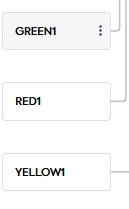
I’ve updated your logic to match the exact step names, and I also removed the flow connector to prevent the logic from being overridden when navigating to a different form step.
---
### Author:  [@JORGEPINEIROF](https://community.feathery.io/u/JORGEPINEIROF)
#### Post date: [May 24, 2025, 4:29pm UTC](https://community.feathery.io/t/how-to-calculate-the-average/1414/5 "2025-05-24T16:29:40Z")
Hi team,
I’m honestly desperate at this point.
I’ve followed your instructions carefully:
- Updated the step names in the logic (`RED1`, `YELLOW1`, `GREEN1`).
- Removed the connector from `laststep1` to prevent conflicts.
- The logic is clean and error-free.
- The button on `laststep1` has `Action: None` and `Validate & Submit Step` is checked.
**Still, when I click the “Siguiente” button on `laststep1`, the logic doesn’t trigger and nothing happens.**
I’m not sure if the problem is in the logic or in how the flow is structured — but I just need it to work.
Please, I’m giving you full permission to access my form and **change whatever is necessary** (logic, flow, buttons, conditions — anything) to make this work. I truly need this solved and I’m completely stuck.
Thanks in advance for your time and support. I really appreciate it.
Best,
---
### Author:  [@Kenny](https://community.feathery.io/u/Kenny)
#### Post date: [May 27, 2025, 3:19am UTC](https://community.feathery.io/t/how-to-calculate-the-average/1414/6 "2025-05-27T03:19:01Z")
> [@JORGEPINEIROF](#):
>
> Siguiente
Hi @JORGEPINEIROF ,
From what I understand, Originally you wanted the user to navigate to a specific step based on the average of the button groups values.
I have published the pending changes and everything seems to be working fine and I was redirected to “YELLOW1” after clicking the final button group.

Do you prefer to trigger the logic when the **Siguiente** was clicked on the **`laststep1`**?